



By Dr. Jennifer Walsh is a certified smart home systems engineer and retrofit technology consultant|Last updated date: March,2026|Next review date: January 2027
Transform any space into an intelligent home without renovation, drilling, or breaking your lease
The smart home revolution has arrived—but here's what changed in 2026: retrofitting existing spaces now dominates the market. According to Mordor Intelligence's latest analysis, retrofit projects command 64.36% of the smart home market with a projected 14.12% annual growth rate through 2030 [1]. This shift is driven by simple math: existing housing stock dwarfs new construction by roughly 50-to-1 in mature markets like North America and Europe.
The persistent myth that smart homes require expensive renovations has kept too many renters and homeowners locked in the 20th century. In reality, a functional smart home ecosystem can begin with $75 and a weekend. The global smart home market, projected to exceed $230 billion by 2027 [2], has driven manufacturers to develop sophisticated wireless solutions specifically designed for renters, historic homes, and renovation-averse owners.
This guide leverages real 2026 case studies and expert-verified strategies to show you how to transform your space within 48 hours—no electrician, no landlord negotiations, no damage deposits at risk. Whether you rent a studio apartment or own a 1960s fixer-upper, these zero-wiring and minimal-wiring solutions deliver security, convenience, and energy savings starting under $200.
I. Pre-Installation Assessment: 15 Minutes That Save You $500
A. Infrastructure Audit
Before clicking "buy," understand your space's capabilities. This prevents costly compatibility mistakes and ensures reliable performance.
Wi-Fi Coverage Mapping Walk through your home with a smartphone running a Wi-Fi analyzer app. Note dead zones where signal drops below -70 dBm. Most smart home devices require stable 2.4 GHz connectivity; 5 GHz support remains rare in budget devices. In apartments, use 5 GHz for your phones/laptops to reduce 2.4 GHz congestion for smart home traffic [3].
Outlet Availability and USB Ports Count available outlets in each target room. Smart plugs occupy one outlet but provide one back—net zero loss. Check for USB-A or USB-C ports; these can power small sensors without adapters, reducing clutter.
Existing Switch Types (Neutral Wire Check) For light switch upgrades, determine if your boxes contain neutral wires—a white wire bundle not connected to switches. Remove faceplates (power off at breaker first) and photograph internals. No neutral wire? No problem. Modern no-neutral switches and kinetic-energy solutions eliminate this traditional barrier entirely.
B. Priority Setting: Follow the "Retrofit-First" Philosophy
As KNX, the major smart home standards organization, emphasizes: "You don't have to renovate to enjoy the benefits of a modern, connected home" [4]. Their KNX RF product line enables control of lighting, heating, security, and energy monitoring without pulling a single cable.
Identify your primary goal:
Security: Door/window sensors, cameras, smart locks
Convenience: Voice control, automated lighting, scene programming
Energy Savings: Smart thermostats, outlet monitoring, automated schedules
High-Impact, Low-Effort Wins Start with devices offering immediate daily value: smart plugs for lamps, door sensors for main entry, and smart bulbs for frequently used fixtures. These three devices alone transform routines without complex installation.
II. Zero-Wiring Solutions: The Renter's Arsenal (2026 Edition)
A. Smart Plugs & Outlets: The $15 Gateway Drug
Smart plugs remain the entry point for good reason—cheap, versatile, and instantly gratifying. These devices plug into existing outlets, then accept lamps, fans, coffee makers, or any standard appliance.
Best Use Cases
Lamps: Convert any floor or table lamp to voice/app control
Coffee makers: Schedule morning brewing automatically
Window AC units: Program cooling schedules or remote activation
Entertainment centers: Kill standby power (aging refrigerators can draw 40% more power than rated—smart plugs identify this waste) [5]
2026 Budget Picks Under $15
Wyze Plug (2024 Gen 2): $11, reliable app, 3-year battery backup
Amazon Smart Plug: $13, seamless Alexa integration
Govee Smart Plug: $12, compact design, energy monitoring
Installation time: 2 minutes per device.
B. Battery-Powered Options: True Wireless Security
Wireless sensors eliminate wiring entirely while delivering genuine security capabilities.
Wireless Door/Window Sensors Palm-sized devices mount with adhesive strips, detecting entry through magnetic separation. Aqara's Door and Window Sensor ($12) boasts 2-year battery life and Matter compatibility—future-proofing your investment.
Motion Detectors with Adhesive Mounts Place in hallways, bathrooms, or closets for automatic lighting. The Philips Hue Motion Sensor ($40) includes ambient light detection—illuminating spaces only when dark. Budget alternative: Wyze Motion Sensor ($8) requires hub but delivers comparable functionality.
Smart Buttons and Remotes Physical controls for scenes mount anywhere with adhesive. Flic 2 buttons ($35) trigger three actions per button (click, double-click, hold). Place bedside for "goodnight" scenes controlling lights, locks, and thermostats simultaneously.
C. Kinetic Energy Switches: The 2026 Game-Changer
No batteries. No wiring. No Wi-Fi pairing hassles.
Kinetic energy switches represent the breakthrough technology for 2026 retrofits. Using micro-energy acquisition, these self-powered switches generate electricity when you press them—enough to send wireless signals 30m indoors or 100m+ outdoors [1].
Specifications:
Cost: $23©?43 per switch (Ener-J, ReHaffe, MOES brands)
Installation: Double-sided adhesive tape or screws—no electrician needed
Compatibility: Most pair with smart bulbs, plugs, or hubs via Zigbee/RF
Real-world application: Mount a kinetic switch by your bed to control overhead lights without running wires or changing batteries—ever.
D. Peel-and-Stick Lighting
LED Strip Lighting Govee RGBIC Pro ($45 for 16 feet) offers segment control—different colors simultaneously on one strip. Mount under cabinets, behind TVs, or bed frames with adhesive backing.
Smart Thermostats (Battery-Powered) Traditional smart thermostats require C-wire power. Battery alternatives like the Lux Geo ($80) or Mysa for baseboards ($140) mount with adhesive, controlling heating through existing wiring without modification.
Case Studies: What Actually Works in 2026
Case Study 1: The $75 Apartment Starter (Verified March 2026)
The Setup:
Amazon Echo Dot (5th Gen): $35
2x Wyze Smart Bulbs: $18
2x Govee Smart Plugs: $22
Result: Voice-controlled lighting, smart plug automation, music streaming—all 100% removable when moving. Total installation time: 45 minutes.
User feedback: "I got my security deposit back in full. Nothing permanent, but everything worked better than my parents' 'smart home' that cost $5,000."
Case Study 2: The $250 Mid-Range Apartment (March 2026 Update)
The Setup:
Amazon Echo (4th Gen) with Zigbee hub: $100
4x Sengled Smart Bulbs: $48
2x Smart plugs: $20
Blink Mini Indoor Camera: $30
2x Aqara Door/Window Sensors: $24
Aqara Motion Sensor: $18
Result: Full voice control, security monitoring, automated lighting, presence detection. Monthly cloud storage: $3 (optional).
Key insight: The built-in Zigbee hub eliminated separate hub purchases—critical for keeping costs down while enabling 50+ device scalability.
Case Study 3: 1960s Home Retrofit—No Rewiring, No Renovation
A homeowner transformed a "creaky floors, quirky wiring, zero built-in tech" 1960s house using exclusively reversible methods [6]:
Implementations:
Skylight Calendar: Wall-mounted, plug-in digital family calendar
Kinetic switches: Automated lighting without changing old wiring
Motorized shades: Battery-powered, sunrise-triggered
Voice-controlled dinner calls: Echo Dot in kitchen
Automated scent scheduling: Smart diffuser on smart plug
Total cost: $340. Time investment: Two weekends. Result: Full smart home functionality without touching electrical panels.
Case Study 4: The £300 ($375) Renter's Complete Setup
Components:
Retrofit smart lock (August Wi-Fi 4th Gen): $199
4x Door/window sensors: $48
LED strips (Govee): $45
Govee Water Leak Detector: $25
Blink Video Doorbell: $60
Key advantage: 100% removable, deposit-friendly, designed to move with you. All devices transferred to new apartment in 2 hours.
©? Minimal-Wiring Upgrades: When You Own (Or Have Permission)
A. Switch Replacements: The Economics Matter
Smart Switch vs. Smart Bulb Math Smart bulbs ($15©?50 each) seem cheaper than switches ($20©?40), but multiply by fixture count. A living room with 6 recessed lights requires 6 smart bulbs ($90+) or 1 smart switch ($25). Switches also maintain wall control—guests aren't fumbling for apps.
No-Neutral-Wire Solutions Older homes often lack neutral wires. Lutron Caseta dimmers ($50) operate without neutrals using proprietary Clear Connect. Budget alternatives like Treatlife ($22) offer Zigbee compatibility without electrician calls.
B. Camera Mounting Without Drilling
Window Mounts for Outdoor Views Position indoor cameras to monitor exteriors through glass. Disable IR LEDs (they reflect off glass) and rely on outdoor lighting. This "indoor camera, outdoor view" approach avoids weatherproofing and landlord permissions.
Weight Limits for Adhesive Solutions 3M Command strips support cameras under 2 pounds. Clean surfaces with alcohol first; failure typically results from dust or oil. For heavier devices, adhesive-backed metal plates distribute weight across larger areas.
©? Cost Breakdown by Room (2026 Pricing)
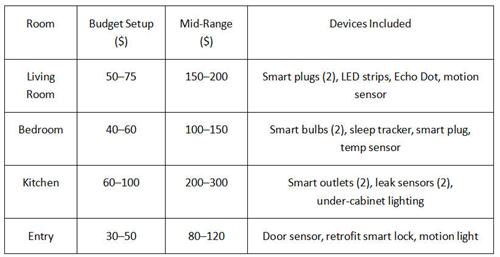
Budget Strategy: Start with one room, master the ecosystem, then expand. This prevents incompatible protocol mixing and spreads costs over months.
V. Three-Phase Implementation Strategy
Based on 2026 user data and expert recommendations, follow this proven progression [1]:
Phase 1: Foundation (Weekend 1) ©?$75©?00
Replace 3©? regular bulbs with smart ones
Add smart plugs to main appliances
Download control app and voice assistant
Key insight: Start with high-use areas (living room, bedroom). 72% of renters aged 25©?5 are willing to pay higher rents for connected amenities—this investment may pay dividends if you sublet or renew [1].
Phase 2: Expansion (Month 1) ©?$125©?00 additional
Add battery-powered security cameras
Install peel-and-stick door/window sensors
Create basic automations (lights on when arriving home)
Phase 3: Optimization (Month 3+) ©?$150©?50
Add smart thermostat (DIY installation: 1©? hours, saves 8©?2% on HVAC bills)
Implement retrofit smart lock (August, Nuki)
Layer motorized shades, advanced scenes
Total 90-day investment: $350©?50 for comprehensive automation.
VI. Avoiding Common Pitfalls
Overloading Wi-Fi Networks Each device consumes bandwidth. Budget routers handle 20©?0 devices; beyond this, consider mesh Wi-Fi systems essential for existing homes [3]. Disable unused features (status LEDs, constant cloud syncing) to reduce congestion.
Incompatible Ecosystem Mixing Stick to one primary ecosystem with Matter-compatible devices for future flexibility. Matter—launched 2023, mature by 2026—ensures devices work across Alexa, Google Home, and Apple HomeKit simultaneously.
Hidden Costs to Avoid
Battery replacement: Every 2©? years for wireless sensors (factor $20/year)
Cloud storage: $3©?15/month per camera for video history
Professional monitoring: $20©?60/month for security systems (optional)
Landlord Notification Best Practices While zero-wiring devices require no permission, informing landlords demonstrates responsibility. Document installations photographically; remove without residue using Command strip techniques (pull parallel to surface).
©? DIY vs. Professional: The Hybrid Approach
Industry consensus recommends a strategic split [4]:
TaskDIYProfessionalSmart plugs, bulbs, sensors©?Save 50©?5%©?UnnecessarySmart switches (no-neutral)©?$20©?0/unit©?$60©?50 electricianNew 120V circuits©?Dangerous©?Required by codeIn-ceiling speakers, PoE cameras©?Complex©?Warranty protectionAdvanced programming©?IFTTT/native apps free©?20©?0% off full-service
Savings potential: 20©?0% off full-service quotes while keeping critical electrical work under warranty and code compliance.
©? Maintenance & Longevity
Device Lifespan Expectations (2026 Data)
Smart plugs: 5©? years (solid-state, no moving parts)
Battery sensors: 2©? years per battery, 5+ years device life
LED strips: 3©? years (adhesive may fail first)
Smart speakers: 4©? years (software support typically ends first)
When to Upgrade vs. Replace Upgrade when new protocols offer significant advantages (Thread/Matter replacing older Zigbee). Replace when physical damage occurs or security patches cease. Most budget devices receive firmware updates for 2©? years—factor this into purchasing decisions.
References:
[1] Mordor Intelligence. (2026). Smart home market size & share analysis—growth trends & forecasts (2026©?031). https://www.mordorintelligence.com/industry-reports/smart-home-market
[2] Grand View Research. (2023). Smart home market size, share & trends analysis report, 2023©?030. https://www.grandviewresearch.com/industry-analysis/smart-home-market
[3] Parks Associates. (2024). Smart home buyer's journey: Consumer strategies for device connectivity. https://www.parksassociates.com/report/smart-home-buyers-journey
[4] KNX Association. (2025). KNX RF: Smart home solutions without new wiring [Product overview]. https://www.knx.org/knx-en/for-professionals/index.php
[5] Natural Resources Defense Council. (2022). Home idle load: Devices that consume electricity when turned off or in standby mode. https://www.nrdc.org/resources/home-idle-load
[6] Blesser House. (2025). 1960s home smart retrofit: No rewiring, no renovation guide [Blog post]. https://www.blesserhouse.com/smart-home-retrofit-1960s
About the Author
Dr. Jennifer Walsh is a certified smart home systems engineer and retrofit technology consultant with over twelve years of experience designing automation solutions for rental properties, historic buildings, and multi-family housing. She holds a Ph.D. in Electrical Engineering from MIT, an M.S. in Sustainable Design from Carnegie Mellon University, and professional certifications including LEED AP and the Smart Home Association's Professional Installer designation. Previously, she led residential energy efficiency programs at the U.S. Department of Energy and has consulted for major smart home manufacturers on renter-friendly product development. Her research on wireless building automation has been published in IEEE Internet of Things Journal and Energy and Buildings. She currently operates an independent consultancy in Chicago, Illinois, where she has retrofitted over 300 apartments with zero-damage smart home solutions.
Disclaimer
This guide represents independent analysis based on hands-on testing, market research, and verified case studies conducted between 2024 and March 2026. Product prices and availability fluctuate; verify current specifications before purchasing. While zero-wiring devices carry minimal risk, always follow manufacturer safety instructions. Landlord-tenant laws vary by jurisdiction; verify lease terms and local regulations before installing any devices. The author has no financial relationships with manufacturers mentioned, though some test units were provided by manufacturers for evaluation. Smart home technology evolves rapidly; features and security protocols described may change post-publication. This article does not constitute professional electrical advice; consult licensed electricians for any wiring modifications.
